Last checked September 18, 2026. This guide follows Microsoft’s current release-health documentation. The status can change as Microsoft ships additional fixes.
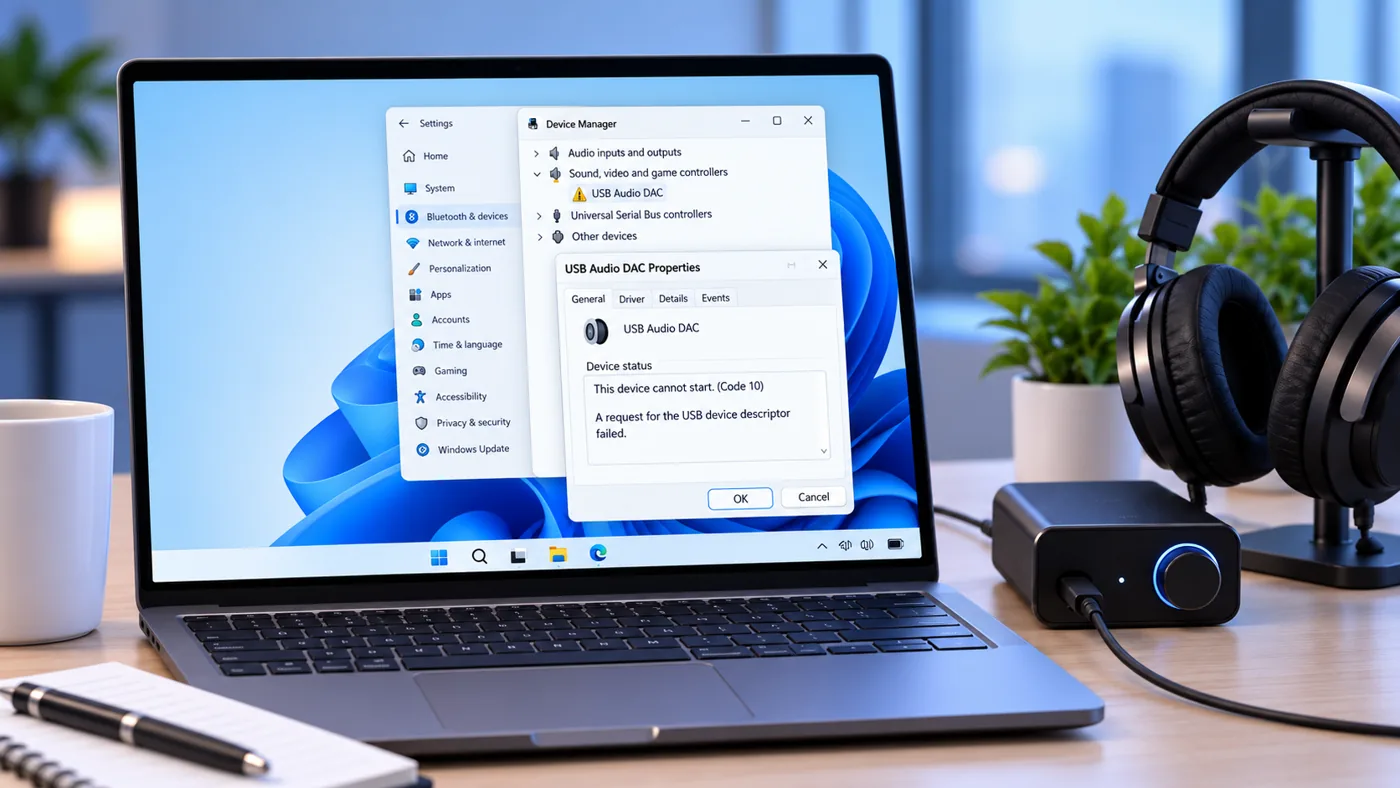
A Windows update can make an audio failure look like dead hardware. That is especially confusing when the device worked before a reboot, Device Manager suddenly shows “This device cannot start. (Code 10)”, or the volume control stays at zero. Before reinstalling Windows, buying a new headset, or removing a security update, identify whether your PC matches the known September 2026 USB-audio issue.
What Microsoft has confirmed
Microsoft says some USB Audio Class 1.0 devices can fail after the September 8, 2026 security updates. Reported symptoms include Code 10 in Device Manager, no audio output, volume controls that do not respond, Sound settings that become unavailable, and multichannel modes that fail even when ordinary stereo still works.
| Windows 11 version | September 8 update | September 14 OOB update | Current USB-audio status |
|---|---|---|---|
| 24H2 | KB5124008, build 26100.9445 | KB5129195, build 26100.9457 | Multichannel/3D symptom partially fixed; Code 10 and no-output symptoms still listed. |
| 25H2 | KB5124008, build 26200.9445 | KB5129195, build 26200.9457 | Multichannel/3D symptom partially fixed; Code 10 and no-output symptoms still listed. |
| 26H1 | KB5124012, build 28000.2954 | KB5129194, build 28000.2956 | Multichannel/3D symptom partially fixed; Microsoft is still working on the remaining symptoms. |
The important detail is partial. Installing the out-of-band update is still the first sensible step, but it does not mean every affected USB-audio device will immediately start working again.
Step 1: confirm your Windows version and update
Press Windows + R, type winver, and press Enter. Note the Windows version and OS build. You can also open Settings > System > About and look under Windows specifications.
Next, open Settings > Windows Update > Update history. Look for the September 8 update shown in the table above, or the September 14 out-of-band update if it has already installed.
This matters because “my USB headset stopped working” is not enough to identify the bug. If the failure started before September 8, or the affected update is not installed, use ordinary Windows audio troubleshooting instead of assuming this regression is responsible.
Step 2: check whether the symptom matches the known issue
Open Device Manager and expand Sound, video and game controllers. If your USB audio device shows a warning icon, open its properties and read the Device status box.
A message that says “This device cannot start. (Code 10)” after the September update matches one of Microsoft’s documented symptoms. So do these patterns:
- The USB headset, DAC, speaker, or interface is detected but produces no sound.
- The Windows volume control stays at zero or does not respond.
- Sound settings become unavailable or stop responding.
- Stereo works, but an 8-channel, 3D, or other multichannel mode does not.
If your problem is only distorted, quiet, crackling, or app-specific audio, you may be dealing with a different issue. Do not force every sound problem into the September-update explanation.
Step 3: determine whether the device is using the USB Audio 1.0 class driver
The confirmed regression is limited to USB Audio Class 1.0. Windows uses the Microsoft usbaudio.sys class driver for USB Audio 1.0-compatible hardware. USB Audio 2.0 has a separate Microsoft driver named usbaudio2.sys.
In Device Manager, open the audio device, select the Driver tab, then Driver Details. Seeing usbaudio.sys is useful evidence that the device is on the USB Audio 1.0 class path. Seeing usbaudio2.sys points to the separate USB Audio 2.0 driver instead. A manufacturer-supplied driver can change this picture, so treat the driver file as a diagnostic clue rather than a universal model-number lookup.
This check is valuable because an older USB interface can be perfectly functional hardware while still relying on the class driver affected by the new update.
Step 4: install the latest Windows update before trying a rollback
Go to Settings > Windows Update and select Check for updates. On Windows 11 24H2 and 25H2, the September 14 out-of-band release is KB5129195. On 26H1, it is KB5129194.
Restart after the update and test the device again. Microsoft’s current documentation says these releases resolve the specific case where some USB Audio Class 1.0 devices worked in normal stereo but failed in multichannel modes such as 8-channel or 3D audio.
If your device still shows Code 10, has no output at all, or leaves the volume controls frozen, that does not prove the update failed to install. Those symptoms remain on Microsoft’s known-issue list as of this guide’s check date.
If stereo works but multichannel does not
First install the September 14 out-of-band update. Microsoft says the multichannel symptom is addressed there.
If you need a temporary diagnostic test before the update is available, switch the device to an ordinary 2-channel/stereo format when that option exists. Microsoft reported that some customers restored audio this way before the OOB fix. Do not confuse this with a fix for Code 10: a device that cannot start at all may not expose a usable format control.
If you still have Code 10 or no sound after the OOB update
Use low-risk checks to separate the Windows regression from a connection problem:
- Restart once after all pending Windows updates finish. Do not judge the result while Windows still shows a pending reboot.
- Connect the audio device directly to the PC. Temporarily bypass a USB-C hub, dock, KVM, extension, or monitor hub. This does not fix the Microsoft bug; it simply removes another variable from the test.
- Try another known-good USB port. Keep the same device and cable so you change only one part of the path.
- Check Device Manager again. Record the exact error and driver details instead of repeatedly uninstalling random devices.
- Test a different audio output. Built-in speakers or Bluetooth audio working normally while one class-compliant USB device fails makes the diagnosis more specific.
If your USB device normally shares a desk connection with displays, storage, and networking, our USB-C hub vs. docking station guide explains why a direct-connection test is useful. If several dock functions fail at the same time rather than only audio, use the same isolate-one-link-at-a-time approach in our Windows 11 dock Ethernet diagnostic. If the display is the failing function, our USB-C monitor troubleshooting guide for Windows 11 walks through video support, cable, and dock checks.
What not to do first
Do not replace the headset or interface just because Code 10 appeared
A known operating-system regression can make healthy hardware look defective. Confirm the update, Windows version, and driver path first.
Do not factory-reset Windows as an early troubleshooting step
A reset is far more disruptive than the evidence justifies when Microsoft already documents a matching update problem.
Do not install random driver packages
If the manufacturer provides a current driver for your exact device, its documentation is relevant. A generic download from an unrelated driver site is not a reliable workaround for a confirmed Windows class-driver problem.
Do not remove the security update as your first move
Windows allows some updates to be uninstalled, but Microsoft notes that removing updates is not generally recommended unless necessary. The September release contains security fixes in addition to the USB-audio regression. First install the latest cumulative/OOB update and confirm that you are actually hitting this issue.
Should you uninstall KB5124008 or KB5124012?
For most home users, I would treat rollback as a last-resort recovery decision, not the first troubleshooting step. The trade-off is straightforward: removing the update may restore an affected device, but it also removes security fixes delivered with that cumulative update until you patch again.
If the USB device is essential for work and you cannot use an alternative output, document your current build and update history before changing anything. On a managed work PC, follow your organization’s support process rather than removing security updates yourself.
For an ordinary home PC, Windows Update’s built-in update history is the safest place to verify what is installed. Avoid scripts that permanently disable Windows Update or delete driver-store files as a shortcut.
A quick decision tree
| What you see | Best next check | What it means |
|---|---|---|
| Audio died right after September 8 update + Code 10 | Confirm version, update ID, and USB Audio 1.0 driver path | Strong match for the confirmed regression. |
| Stereo works, 8-channel/3D fails | Install September 14 OOB update | This is the symptom Microsoft says the OOB update fixes. |
| Code 10 remains after OOB update | Direct USB test, exact Device Manager status, then monitor Microsoft’s release-health page | Microsoft still lists the other USB Audio 1.0 symptoms as unresolved. |
| USB audio failed before September 8 | Use normal Windows audio troubleshooting | The timing does not support this specific update regression. |
| Only devices attached through one hub fail | Test them directly on the PC | The hub/cable/path may be a separate variable. |
Why this issue is easy to misdiagnose
USB audio devices often work for years without a separate manufacturer application because Windows supplies a class driver. That convenience means a class-driver regression can affect seemingly unrelated products at the same time. A headset, DAC, speaker, and older audio interface may look like four different hardware categories while sharing the same underlying Windows USB-audio path.
That is also why buying a newer device is not a sound first diagnostic. The useful question is not “Which headset should I replace this with?” It is “Did the operating-system update change the path that was working yesterday?”
For creator or streaming setups, make a short local recording after audio returns before going live. Our $200 streaming setup guide uses the same principle: test the existing audio chain before spending money on a replacement microphone.
Frequently asked questions
Does KB5129195 completely fix the Windows 11 USB-audio problem?
No. Microsoft’s current documentation describes the September 14 update as a partial resolution. It fixes the documented multichannel/3D-audio symptom, while Code 10, no output, unresponsive volume, and unavailable Sound settings remain under investigation.
Is every USB headset affected?
No. Microsoft limits the confirmed issue to some USB Audio Class 1.0 devices. USB Audio 2.0 devices use a separate class driver, and many products use manufacturer-specific drivers.
How do I know whether I have KB5124008?
Open Settings > Windows Update > Update history. Windows 11 24H2 and 25H2 received KB5124008 on September 8. Windows 11 26H1 uses KB5124012 for the corresponding September security update.
Should I buy a new USB audio device?
Not until you rule out the confirmed Windows issue. If the device worked immediately before the update and now matches Microsoft’s symptoms, replacement is a poor first diagnostic step.
Will switching USB ports fix Code 10?
Microsoft has not published a different-port change as the resolution for this September regression. Trying another port is still a useful diagnostic because it helps rule out a hub, connector, or local USB-path problem.
For Excel copy-and-paste failures after the September Office updates, use our KB5002665 troubleshooting guide to check the applicable fix and remaining limitations.
Official sources and update tracker
- Microsoft Windows 11 release health: 26H1 known issues
- Microsoft: KB5124008 for Windows 11 24H2 and 25H2
- Microsoft: KB5129195 out-of-band update
- Microsoft Learn: USB Audio Class system driver (Usbaudio.sys)
- Microsoft Learn: USB Audio 2.0 driver (usbaudio2.sys)
- Microsoft: Windows Update FAQ
Bottom line: if a USB Audio Class 1.0 device stopped working after the September 2026 Windows 11 security update, confirm the update and driver path, install the latest out-of-band/cumulative update, and avoid replacing hardware or rolling back security patches until you know which symptom you actually have. Microsoft has fixed the multichannel case, but the broader Code 10/no-output problem is not fully resolved as of September 18.